Wednesday, 13 May 2020

Python Tkinter GUI: Padding tk Label field || Python tk label customize

Python Tkinter GUI: Padding tk Label field || Python tk label ...


Python Tkinter GUI: Padding tk Label field || Python tk label customize

How to padding Python Tkinter label?
How to set Python Tkinte label padding?
how to add padding in tkinter?


Code:
import tkinter as tk
Window = tk.Tk()
Window.geometry("250x200")
Window.wm_iconbitmap('NH.ico')
Window.title("Label Tutorial")
label = tk.Label(Window, text="Insert your text: ")
label.grid(row=0, column=0, pady=5, padx=5)
entry = tk.Entry(Window)
entry.grid(row=0, column=1, pady=5, padx=5)
label1 = tk.Label(Window, text="Your text")
label1.grid(row=1, pady=5, padx=5)
Window.mainloop()

Python Tkinter GUI: Modify tk Label font name, color and size || Python tk label customize

Python Tkinter GUI: Modify tk Label font name, color and size ...
Python Tkinter GUI: Modify tk Label font name, color and size || Python tk label customize

How to change tkinter label font name and color?
How to set Python tkinter label font ?
How to set tkinter label background color?


Code:
import tkinter as tk
Window = tk.Tk()
label = tk.Label(Window, text="Hello ", bg="#000000", font=('Verdana', 14, 'bold'), fg="#fff")
label.pack()
label1 = tk.Label(Window, text="Hi, Web ", bg="#ccc", font=('Verdana', 14, 'bold'), fg="#fff")
label1.pack()
Window.mainloop()


#Python
#Tkinte
#Label
#font
#color
#font_size
#background

Python Tkinter GUI: Title, Icon and Geometry Setting || Python Tk

Python Tkinter GUI: Title, Icon and Geometry Setting || Python Tk ...
Python Tkinter GUI: Title, Icon and Geometry Setting


How to change Python Tkinter Title and Icon?
Set Python Tkinte Title and Icon!


Code:
import tkinter as tk
Window = tk.Tk()
Window.geometry("250x200")
Window.wm_iconbitmap('NH.ico')
Window.title("Label Tutorial")
Window.mainloop()


#Python
#Tkinte
#Title
#Icon
#Geometry

Monday, 27 April 2020

Java jFrame transfer data from one jFrame to another jFrame | Java Swing...

Java jFrame transfer data from one jFrame to another jFrame | Java Swing | Eclipse

Send data from one jFrame to another jFrame | Java Swing | Eclipse

Java jFrame transfer data from one jFrame to another jFrame | Java ...

#Send_Data

#Java_Swing

#Java_jFrame

#Window_Builder

#setVisible()

#Eclipse


Java Swing send data from one jFrame to another jFrame | Window Builder | Eclipse

Java Swing send data from one jFrame to another jFrame | Window Builder | Eclipse

Transfer data from one jFrame to another jFrame

Java Swing send data from one jFrame to another jFrame Window ...

 #Java_Swing
#Java_jFrame
#Window_Builder
#Send_Data
#Eclipse

Java jFrame Open one jFrame to another jFrame [setVisible() dispose()] | Java Swing | Eclipse

Java jFrame Open one jFrame to another jFrame [setVisible() dispose()] | Java Swing | Eclipse
Java Swing Call One Frame to Another Frame | Window Builder | Eclipse

Java jFrame Open one jFrame to another jFrame [setVisible ...

 #Java_Swing
#Java_jFrame
#Window_Builder
#setVisible()
#Eclipse

Java Swing open one jFrame to another jFrame [setVisible() dispose()] | Window Builder | Eclipse

Java Swing open one jFrame to another jFrame [setVisible() dispose()] | Window Builder | Eclipse
Java Swing Call One Frame to Another Frame | Window Builder | Eclipse


Java Swing open one jFrame to another jFrame [setVisible() dispose ...


#Java_Swing
#Java_jFrame
#Window_Builder
#setVisible()
#Eclipse

Tuesday, 27 October 2015

Adding a Google Map on Your Web Page


Some guys don't know hot to Add a Google Map on His Personal Web Page. Its very easy.

Firstly go "Google" and write 'Map' then open the 'Google Map' and write your place name. Now, above left side of Google Map page click 'Menu' button after click menu button you will watch a menu list then select "Share or embed map" option, then click 'Embed map' option and copy the link then paste the that on your Web page where you want to show that.

Bellow show the map:


Watch the Tutorial Video:


Practicing File Download link: Click Here

Example File View

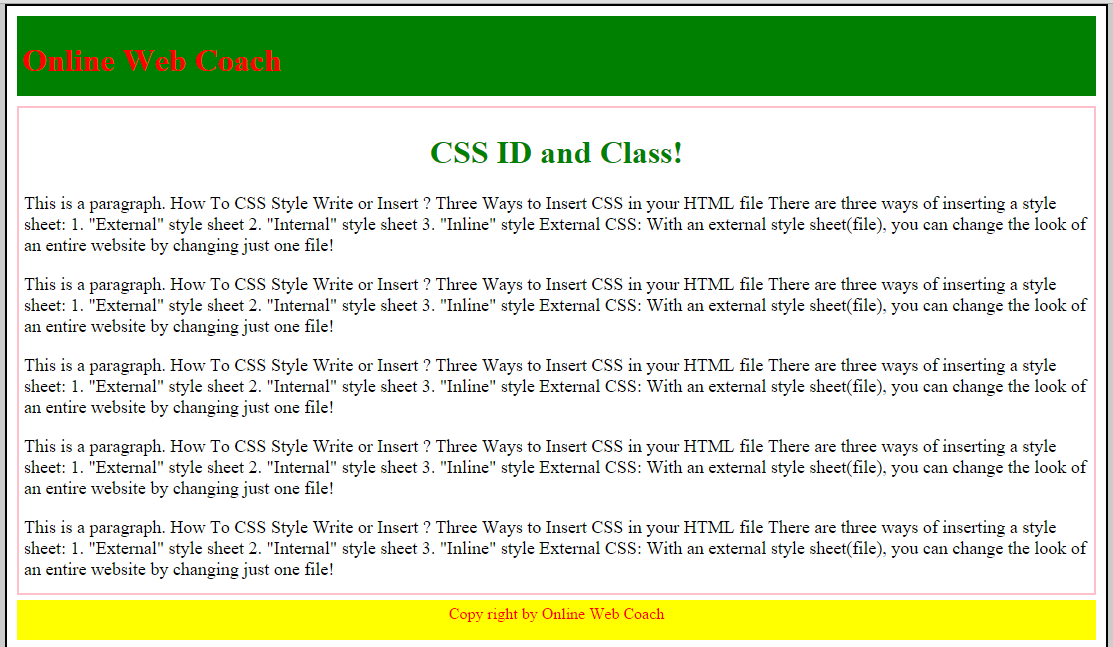
CSS ID and Class


CSS ID and Class its a bsic things of CSS. You must need to know about CSS ID and Class if you want to be a good designer.

CSS ID 

Its a uniqe part of division, thats mean its using DIV part of you HTML or Web page.

You can take CSS ID using any singel word/ name/ letter. 

CSS ID its declare with hash(#) tag its(#) take before your ID name [Such as #id_div{} ]

#header_div{
background-color: green;
width: auto;
padding:5px;
height:70px;
}

CSS Class

Its a uniqe part of division, its like child of CSS ID thats mean its using DIV part of you HTML or Web page.

You can take CSS Class using any singel word/ name/ letter. 

CSS Class its declare with dottet(.) tag its(.) take before your Class name [Such as .class_div{} ]

.post_div{
background-color: #fff;
width: auto;
margin-top:10px;
padding:5px;
border: 2px solid pink;
}

Watch Tutorial Video:


Example File Download Link: Click Here

Example Page View: