Monday, 27 April 2020

Java jFrame transfer data from one jFrame to another jFrame | Java Swing...

Java jFrame transfer data from one jFrame to another jFrame | Java Swing | Eclipse

Send data from one jFrame to another jFrame | Java Swing | Eclipse

Java jFrame transfer data from one jFrame to another jFrame | Java ...

#Send_Data

#Java_Swing

#Java_jFrame

#Window_Builder

#setVisible()

#Eclipse


Java Swing send data from one jFrame to another jFrame | Window Builder | Eclipse

Java Swing send data from one jFrame to another jFrame | Window Builder | Eclipse

Transfer data from one jFrame to another jFrame

Java Swing send data from one jFrame to another jFrame Window ...

 #Java_Swing
#Java_jFrame
#Window_Builder
#Send_Data
#Eclipse

Java jFrame Open one jFrame to another jFrame [setVisible() dispose()] | Java Swing | Eclipse

Java jFrame Open one jFrame to another jFrame [setVisible() dispose()] | Java Swing | Eclipse
Java Swing Call One Frame to Another Frame | Window Builder | Eclipse

Java jFrame Open one jFrame to another jFrame [setVisible ...

 #Java_Swing
#Java_jFrame
#Window_Builder
#setVisible()
#Eclipse

Java Swing open one jFrame to another jFrame [setVisible() dispose()] | Window Builder | Eclipse

Java Swing open one jFrame to another jFrame [setVisible() dispose()] | Window Builder | Eclipse
Java Swing Call One Frame to Another Frame | Window Builder | Eclipse


Java Swing open one jFrame to another jFrame [setVisible() dispose ...


#Java_Swing
#Java_jFrame
#Window_Builder
#setVisible()
#Eclipse
Tuesday, 27 October 2015

Adding a Google Map on Your Web Page


Some guys don't know hot to Add a Google Map on His Personal Web Page. Its very easy.

Firstly go "Google" and write 'Map' then open the 'Google Map' and write your place name. Now, above left side of Google Map page click 'Menu' button after click menu button you will watch a menu list then select "Share or embed map" option, then click 'Embed map' option and copy the link then paste the that on your Web page where you want to show that.

Bellow show the map:


Watch the Tutorial Video:


Practicing File Download link: Click Here

Example File View

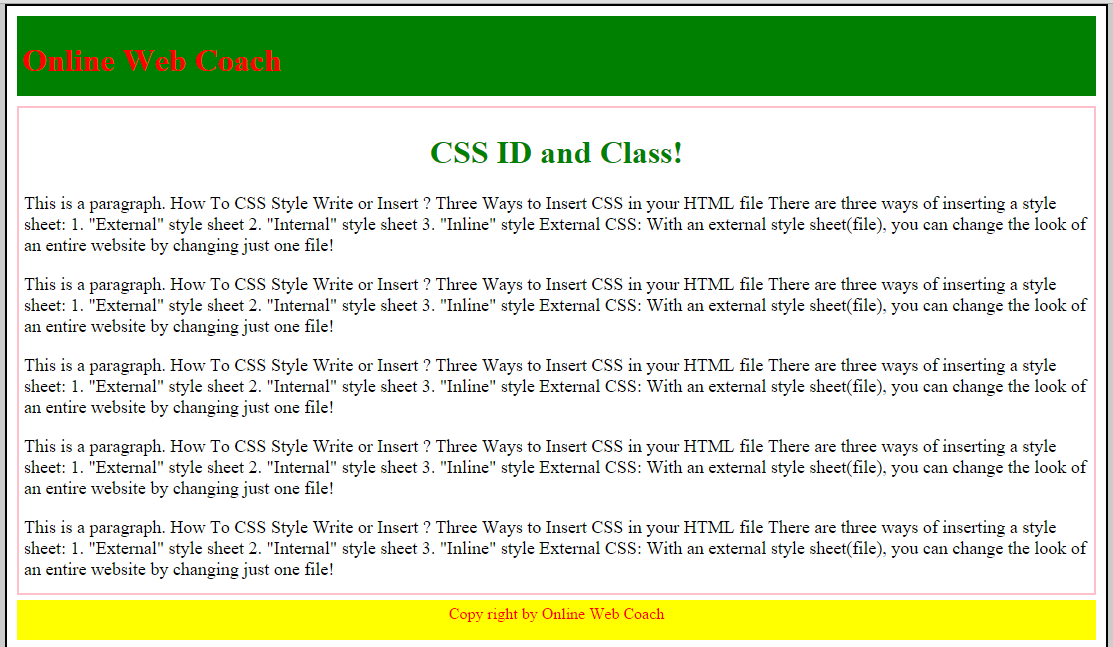
CSS ID and Class


CSS ID and Class its a bsic things of CSS. You must need to know about CSS ID and Class if you want to be a good designer.

CSS ID 

Its a uniqe part of division, thats mean its using DIV part of you HTML or Web page.

You can take CSS ID using any singel word/ name/ letter. 

CSS ID its declare with hash(#) tag its(#) take before your ID name [Such as #id_div{} ]

#header_div{
background-color: green;
width: auto;
padding:5px;
height:70px;
}

CSS Class

Its a uniqe part of division, its like child of CSS ID thats mean its using DIV part of you HTML or Web page.

You can take CSS Class using any singel word/ name/ letter. 

CSS Class its declare with dottet(.) tag its(.) take before your Class name [Such as .class_div{} ]

.post_div{
background-color: #fff;
width: auto;
margin-top:10px;
padding:5px;
border: 2px solid pink;
}

Watch Tutorial Video:


Example File Download Link: Click Here

Example Page View:

Friday, 5 June 2015

Inline CSS Style


An inline style it may be used to apply a unique style for a single element in HTML.

An inline CSS style loses many of the advantages of a CSS style sheet. Use this method sparingly!

To use inline CSS styles, add the style attribute to the relevant tag. The style attribute can contain any CSS property.

<h3 style="color:red; margin-left:40px;">This is a third heading.</h3>

Internal CSS Style


An internal style sheet it may be used if one single page has a unique style or different from other pages.

Internal CSS styles are defined within the <style> element it's start with <style> tag and end of with </style>, inside the head section of an HTML page:

<head>
<style>
body {
    background-color: green;
}

h1 {
    color: red;
    margin: auto;

</style>
</head>

External CSS Style Sheet


With an external style sheet(file), you can change the look of an entire website by changing just one file!

Each HTM page must be include a reference to the external CSS style sheet file inside the <link> element. The <link> element goes inside the <head> section:

<head>
<link rel="stylesheet" type="text/css" href="style-sheet.css">
</head>

you can write external style sheet in any text editor. The file should not contain any html tags. The style sheet file must be saved with a .css(style-sheet.css) extension. An example of a style sheet file called "style-sheet.css", is shown below:

body {
    background-color: green;
}

h1 {
    color: red;
    margin: auto;
}